Saturday, December 19, 2009
Computin’ in the Country

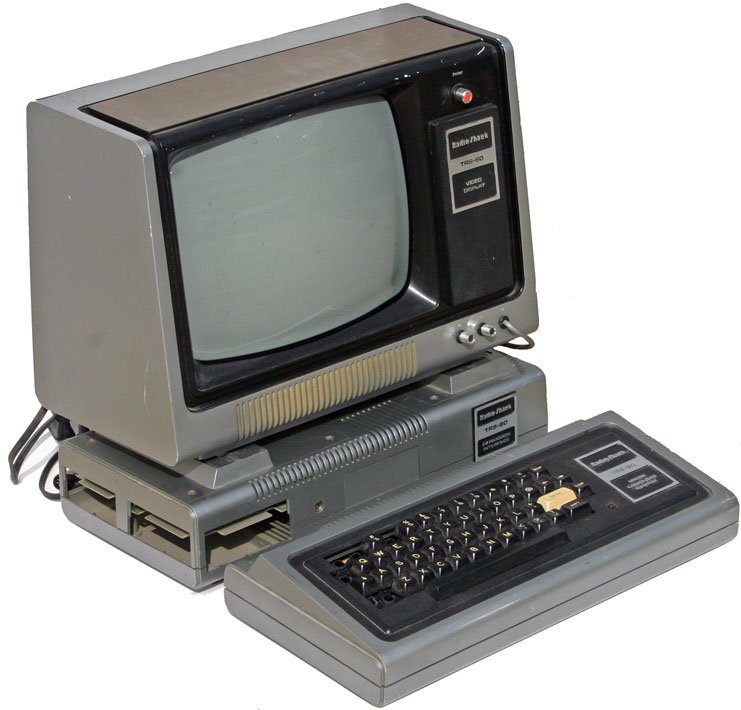
I’d just returned to Possum Swamp bearing my first PC, a RadioShack TRS-80 Model 1, aka “Trash 80.” It wasn’t a perfect computer, not e’en close, but I loved it very much and it was an exciting time to be into PCs whether you had a fancy Apple II or a proletarian machine from the 'Shack.
At first blush, my TRS-80, whose graphics, if you could call them that, consisted of blocky ascii characters, didn't seem of much use for astronomy. That didn't matter; it sure played a mean game of Star Trek. When I could get the freaking tape to load off the cassette player that served at the Trash 80's storage medium, anyway. It was also obvious it would be usueful in amateur radio, at least for logging, and maybe even for sending and receiving radioteletype. But astronomy? Didn't seem like it...
I wasn't the only cat who was being charmed by what we was calling “microcomputers” or “home computers,” either. Amazingly, the newsstands were beginning to fill-up with honest-to-god computer magazines covering everything from my Radio Shack box to Apples, to newcomers like the Commodore VIC-20 and Texas Instruments' TI-99/4A. These magazines didn't all feature professional writers and professional production values, but, still, they were a long ways from the mimeographed sheets that had fulfilled their role during the previous decade.
In one of those early magazines, I came upon the aforementioned column, “Computing in the Country,” that was, during its brief life, my favorite. The author was a dude who might have been the Uncle Rod of the early PC era. Every month, he dispensed plenty of down-home and often corn-ball wisdom on then-puzzling subjects like dbase II and the CP/M operating system: “Run Wordstar on an 8080 CP/M machine and you are walkin’ in high cotton.” I wish I could read some of those pieces again, or at the very least recall the author’s name, or even the magazine he appeared in.
That could have been a (then) modest little rag out ot Titusville, Florida, Computer Shopper, published by Glen Patch, the same guy who still does the excellent and lively Shutterbug. Or it could have been one of the little-noted-nor-long-remembered self-published computer hobbyist pubs of those days. In fact, I believe it was one of those, another tiny Florida-based magazine, Computer Trader ("For Most Computers and Ham Radio"), that was popular with the hamfest/computer show crowd during the mid 80s.

I've found a little about Computer Trader on the Internet, but only a little. There are a couple of issues online, but none has the "Computin'" column. I have little doubt The 'Trader was where I read them, though.
Yep, I just loved them microcomputers. They were MY BAG, man. Not that, as above, I looked on ‘em as a potential tool for amateur astronomy, you understand, not in the beginning. Mostly, they were a diversion like the first video game I played in the late 70s, Space War, at McCain Mall’s Aladdin's Castle arcade in Little Rock. For most of us lusting after TRS-80s and Apple IIs, PCs were an end in themselves, like ham radio—or amateur astronomy. Sure, the makers of the store-bought computers that were beginning to displace S-100 bus kits said you could do stuff like BALANCE YOUR CHECKBOOK. But that wasn’t the draw. The draw was that they were just so darned cool. All the Heinlein and Clarke and Asimov promises coming true in your den.
By the middle of the 1980s, I was aware computers were a standard fixture of professional observatories, but I didn't have even an inkling of the impact they'd have on amateur astronomy till the afternoon I was browsing Springdale Plaza's Commodore 64 store. Oh, it wasn’t billed as a “Commodore 64 store,” just a “computer store.” But almost everything in it was intended to run on or support the much-loved C-64 and little sis VIC-20.
If you didn't experience those days, you have no idea how popular the Commodore 64 was or the impact it had, not just on the emerging Nerd Class, but the public at large. For the comparatively modest sum of 500 bucks (and much less in a few years), you could have a machine that, while maybe not as versatile as the Apple II, worked about as well and was considerably more affordable. An Apple II+ would cost you almost three times as much—and quite a bit more if’n you sprang for one of those awesome Apple Disk ][ 5.25-inch floppy drives. The C-64’s popularity also meant there was tons of software for it, soon far more than Apple could boast (even if most of the C-64-ware was games).
 I have no idea why I was in the C-64 store on that long-ago afternoon in 1985. Maybe I was hunting inexpensive disks for my Commodore 1541 floppy drive. Whatever the reason, a glance at the software rack pulled me up short: “Commodore Presents the Universe by the Magic of Sky Travel, a Window to Our Galaxy.” I snatched that sucker up, quickly read that it would plot stars, constellations, planets, and even COMET HALLEY, and without any deliberation produced the near 35 big 1985 dollars Commodore demanded despite HARD looks from my then-wife. Hell, THERE WAS A PICTURE OF AN ORANGE TUBE CELESTRON C8 TELESCOPE ON THE PACKAGE! How could I resist?
Today’s verdict on Sky Travel (that's a screenshot at the top) would be “primitive.” With the 64’s 320 x 200 display, it couldn’t have been otherwise. Nevertheless, the simple graphics were excellent by the standards of a simpler time, and the soft was surprisingly feature-laden and even useful. It would show what was up for a given date or time, including the planets. It displayed about 1200 stars (considerably more than my Edmund planisphere), had some rudimentary animation features, and would, indeed, plot that scamp, Halley, as he floated through the constellations.
‘Course, at boot-up Sky Travel also displayed “Please be patient while program modules are loading…we’re loading a big chunk of the universe into a very small computer,” and there were long pauses after you did anything. But it was a start, and before long I'd glommed onto a ROM cartridge called "Epyx Fastload," which really sped-up the glacially slow Commodore 1541 serial disk drive.
Yep, I just loved them microcomputers. They were MY BAG, man. Not that, as above, I looked on ‘em as a potential tool for amateur astronomy, you understand, not in the beginning. Mostly, they were a diversion like the first video game I played in the late 70s, Space War, at McCain Mall’s Aladdin's Castle arcade in Little Rock. For most of us lusting after TRS-80s and Apple IIs, PCs were an end in themselves, like ham radio—or amateur astronomy. Sure, the makers of the store-bought computers that were beginning to displace S-100 bus kits said you could do stuff like BALANCE YOUR CHECKBOOK. But that wasn’t the draw. The draw was that they were just so darned cool. All the Heinlein and Clarke and Asimov promises coming true in your den.
By the middle of the 1980s, I was aware computers were a standard fixture of professional observatories, but I didn't have even an inkling of the impact they'd have on amateur astronomy till the afternoon I was browsing Springdale Plaza's Commodore 64 store. Oh, it wasn’t billed as a “Commodore 64 store,” just a “computer store.” But almost everything in it was intended to run on or support the much-loved C-64 and little sis VIC-20.
If you didn't experience those days, you have no idea how popular the Commodore 64 was or the impact it had, not just on the emerging Nerd Class, but the public at large. For the comparatively modest sum of 500 bucks (and much less in a few years), you could have a machine that, while maybe not as versatile as the Apple II, worked about as well and was considerably more affordable. An Apple II+ would cost you almost three times as much—and quite a bit more if’n you sprang for one of those awesome Apple Disk ][ 5.25-inch floppy drives. The C-64’s popularity also meant there was tons of software for it, soon far more than Apple could boast (even if most of the C-64-ware was games).

Today’s verdict on Sky Travel (that's a screenshot at the top) would be “primitive.” With the 64’s 320 x 200 display, it couldn’t have been otherwise. Nevertheless, the simple graphics were excellent by the standards of a simpler time, and the soft was surprisingly feature-laden and even useful. It would show what was up for a given date or time, including the planets. It displayed about 1200 stars (considerably more than my Edmund planisphere), had some rudimentary animation features, and would, indeed, plot that scamp, Halley, as he floated through the constellations.
‘Course, at boot-up Sky Travel also displayed “Please be patient while program modules are loading…we’re loading a big chunk of the universe into a very small computer,” and there were long pauses after you did anything. But it was a start, and before long I'd glommed onto a ROM cartridge called "Epyx Fastload," which really sped-up the glacially slow Commodore 1541 serial disk drive.
A start and a promising one for doing useful things in amateur astronomy with a PC. I loved the program and used it frequently. It was very well done for Commodore software, which sometimes reeked of snake oil. I know I wish I still had the excellent 140-page book that came with Sky Travel. Or that I could recapture the amazement I felt when I discovered it really would show the sky just as it was right now or years past or years in the future with a few keystrokes—no mouse back then, of course.
 The Commodore never became a huge force in amateur astronomy, maybe because by the time more astro-ware began to appear for it and more amateurs decided astronomical computing was a Good Thing, the C-64’s race was just about run. A few outfits, notably Zephyr Services, did dispense some decent astro-apps for the Commodore before the thinning of the microcomputer herd that took not just the Atari 400s, TI-99/4As and Timex Sinclairs, but, eventually, the C-64, too. That came when IBM PC compatibles began to come down in price at the end of the 80s. Mostly, good astronomy software had to wait for more capable machines, like my first IBM, a genu-wine IBM 486 with a—GASP!—VGA (640 x 480) color graphics “adapter.”
I was soon having a lot of fun and doing real work with increasingly sophisticated software beginning with David Chandler’s amazing Deep Space 3D, but computing didn’t really change my astronomy life a whole lot till the 1990s began to run out. That was when laptop PCs finally became inexpensive enough to make me willing to lug one onto damp observing fields.
Today? As I intimated week before last, you see darned near as many computers at star parties as you do telescopes. For even PC savvy astro-novices, though, getting up and operating for astronomy with a laptop out in the dark, computin’ in the country, can be confusing and intimidating. Since I’ve been down this road, you might find my (somewhat opinionated) observations of interest.
If you’re gonna hook a laptop to a telescope for gotos or for controlling a CCD camera, you need a laptop, right? Which laptop, as in which brand, though? I’ve heard today’s laptop computers are usually more alike than different, with the guts often coming from the same far eastern factories no matter whose name is on the case. That may be, and I’m sure it’s possible to get a good computer from any of the major brands. But my personal experiences tell me some are better than others. Do keep in mind that obviously I’ve only owned or heard about a tiny sample, which may not be entirely representative.
If you want to know what I think about brands, it’s this: stay away from HP. We’ve had a fair number of PCs here, and the only problem-children have been from the formerly uber-quality-conscious Hewlett Packard. Example? When the younger daughter started her senior year of high school, Miss D. and I decided it was time to get her a nice laptop. We made some suggestions but let her do the actual choosing. What came out on top with the features she wanted and within the budget we’d set was an HP. Big mistake, or so it turned out.
Lizbeth enjoyed her computer and used it heavily for about five months. “Used” heavily, but not “abused.” One afternoon, I passed her bedroom upstairs and heard a curious sound, something like a jet spinning up its turbines in preparation for its takeoff roll. A little investigation revealed the sound was coming from Elizabeth's closed laptop. Further checking showed that the screen was black as ink and that the fans were spinning at full tilt. HP’s opinion was “fatal hardware failure.”
 Luckily for my wallet, Miss D. had insisted on buying an extended warranty from BestBuy. Normally, I steer clear of such things, which are usually not economically advantageous for the buyer, but in this case Dorothy was correct. We didn’t have any trouble getting a replacement from BestBuy, with the folks there telling Lizbeth to choose another laptop for the same price but, in their opinions, “Maybe don’t let that be an HP.” The curious thing is that that other HP brand, Compaq, seems better. Miss Dorothy has one of their machines and it’s been fine over about two years of relatively light use.
Any computer can go schizoid on ya, of course, but the HP’s quick and ignominious death isn’t the only thing that recommends against ‘em for me. As was the case with the (unreliable) HP desktop I owned for a while, Lizbeth’s machine was absolutely jam-packed to the gills with useless junk-ware programs. Yeah, it was easy enough to delete all that mess that included everything from trial versions of software she didn’t want in the first place to countless crappy games, but why should we have had to?
Who else don’t I like? I say stay away from Sony. Yeah, their laptops look spiffy, but it seems whenever I go in a big box store, the Sony Vaios are the only machines on display that are not working right—or at all. Given the fairly poor design and quality of a DVD recorder I bought from them recently, I judge the formerly famous Sony quality ain’t quite what it used ta be.
In more general terms? I’d avoid the cheapest of the cheap, like those regularly on special at Walmart, no matter whose brand name is on ‘em. Laptops have come down in price, but you still get what you pay for, and it’s likely a three hundred dollar computer will perform and last like, well, a three-hundred dollar computer. Expecting the components in the loss leaders to be of the same quality as those in a brand’s more expensive machines is asking a lot in my opinion.
So who do I like? The two brands we’ve had the most success with are Dell and Toshiba. When the older daughter left for college, we sent a Dell laptop with her, and it easily survived and thrived for four years of strenuous undergraduate life. More to the point, the astronomy computer here for the last five years or so has been a Toshiba Satellite. Not only has it spent night after night on countless dew-soaked observing fields, it’s traveled coast to coast with me giving talks at amateur gatherings from West Virginia to Washington (the state). Never a hiccup, never a problem; it just works.
How about an Apple laptop? If you want to go that way, I salute you. Sort of, anyhow. The Apple machines are high in quality—if considerably more expensive than most Win boxes—and have some pluses. Before you commit to one, though, leastways if you are not already a Mac user, make sure the astro-ware available for “the other guys” is gonna meet your needs. Apples have Intel processors these days and can (relatively) easily run Windows, but why pay more for a Mac if you’re just gonna run Win apps on it?
Once you’ve settled on a brand, which features should you look for when choosing a model for astronomical use? I know what you’re thinking, but there’s no use wishing and pining for serial and parallel ports. Despite the fact that quite a lot of our astro-gear still uses these antique interfaces, it’s not likely you’ll find a new computer with either. The best you can hope for is a good number of USB 2.0 ports.
Raw Power is a consideration to some extent, “raw power” as in processor speed and hard drive capacity. Processor speed is not really that big a deal if, like me, all you’ll do with your computer is run astronomy software, MS Office, and browse the web. With the noted exception of Starry Night Pro Plus, most astro-ware is not at all demanding as far as processor speed or graphics capability. Even SNPP’s requirements pale beside those of something like Fallout 3. If, however, you’ll be processing your CCD images with the computer, especially big CCD images, you’ll want a lively CPU.
How much hard drive space you need also depends on what you will do with your machine. While more drive space (like more processor power) is rarely a bad thing, if you’re just using Cartes du Ciel to send your scope on go-tos, you don’t need much. On the other hand, if you are running a big-chip CCD camera and storing the resulting images on your disk, the more the better.
How about the display? The screen? Definitely, “bigger is better.” Believe you me, even if your eyes are better than my middle-aged ones, you’ll want a nice large display. Take a look at your fave astro app: see them object labels that are so legible? They’ll look like smudges out in the dark with a red filter over the screen and the brightness turned way down. A big high-quality display makes the difference between fun and frustration in astronomy.
One final basic consideration for astro-laptops is ergonomics. Are the USB ports conveniently placed on the side or front of the case? How about other connectors and card slots? Are they easy to get at? Is the keyboard large enough and well designed enough to make it easy to use in low light? How about the mouse-pad or other pointing device? You will find that things that are minor annoyances in the daylight at home will make you cuss a blue streak on a dark field at Chiefland or Prude Ranch.
There is a new breed of portable computer some amateur astronomers are latching on to, the “netbook.” These are small Windows PCs (mostly running XP but now transitioning to Windows 7). What’s the draw? They are cheap and they are very, very portable. I was immediately drawn to these itty-bitties, which are being produced at a frantic rate by all the major laptop makers. I thought one might be perfect for astronomy.
Unfortunately, the netbook displays are something of a problem for me. For my eyes, netbook screens, which are typically 9 or 10-inches in size diagonally, are a little too small and low in resolution (typically 1024 x 600). I have a hard time using a netbook’s small display comfortably in the dark, even with my most powerful reading glasses on. I reckon I might be able to get used to the screen’s small size, but I doubt I’d get to like it.
There is another more serious netbook video "problem," their low resolutions. Many astro-programs will not work exactly right at 1024 x 600. Oh, they’ll run, but some windows will be cut-off. Usually, and unfortunately, the part of the window with the “OK” and “Cancel” buttons. You may be able to increase resolution “virtually” in “Settings,” but that means you’ll have to scroll the screen, which is workable but annoying. Some netbooks will allow you to bump the resolution setting up and fool the machine into thinking it's got a higher resolution display, but that results in graphics that are slightly stretched out horizontally.
The more I’ve thought about it, the less I’ve come believe a netbook is for me. I mean, how much portability do you really need? Even my big Toshiba takes up less space than the eyepiece case. I suppose I might still think about a netbook, not for the telescope field, but to accompany me on my speaking tours. When you’re trudging through an airport, small is definitely beautiful.
One thing about netbooks is superior for astronomy, I’ll admit: their power-sipping nature. Some will run six or seven hours on their internal batteries and go dang near forever on a jumpstart bat’ry pack. Which is easy to do. Some (not all) netbooks, unlike laptops, can be run directly off 12 volts DC with a simple and inexpensive cord that plugs into a cigarette lighter socket.
What do you do about power if you want to use a standard laptop in the field? First, you can probably forget about built-in batteries. My high-speed P4 Toshiba might go 45 minutes on internal power. Depending on the machine, even a jumpstart battery may not be enough. I generally run my laptop with a big honkin’ trollin’ motor (deep cycle marine) battery. E’en if your computer ain’t that power hungry itself, keep in mind that some USB devices will power themselves via the computer’s battery. The Meade DSI camera, for example, will run down a jump starter in a right quick hurry.
What to do? There are two ways to run a regular laptop off DC. First, you can use a DC - DC power supply designed specifically for your laptop. A DC power brick is an efficient, neat way to go, but make sure to buy one with enough current capacity. The one I’ve got for my big Toshiba is on the hairy edge. It will run the computer by itself all night, but if I plug in a power-using USB device, or even just my PCMCIA serial card, the power supply trips off line.
What do I do, then? I use an inverter, one of the little gadgets that transforms flat line DC current into sinuous sine wave AC. Connect the inverter to the battery via a pair of alligator clips or a cigarette lighter connector, and plug the laptop’s normal power supply into one of the AC receptacles on the inverter. Nothing could be simpler, and inverters are inexpensive and readily available; they are easy to find in automotive discounters and in the auto-parts departments of Wal-Mart and other big boxes. The catch? An inverter, like anything else, cannot be 100% efficient. Some of the DC is inevitably dissipated as heat during the conversion process, so a battery will never last as long with an inverter as it will when powering a computer directly with DC.
I’m sometimes asked about the quality of the AC put out by inverters. It’s hardly perfect, but a modern inverter is easily capable of producing AC more than good enough for a laptop. When buying, make sure to choose an inverter that puts out enough current for the computer. In other words, at least glance at the label on your machine’s AC supply before going shoppin’.
You've got a computer and a way to power it, but I know you’ve got other questions. Plenty of ‘em. Where do you put the computer? How do you protect it from dew? What’s needed to connect it to the telescope? All good and valid questions, but, alas, we are outa time and space for yet another week. I have addressed these things here in the past, but I wouldn't mind givin’ you a fresh take on ‘em Real Soon Now, muchachos.
 Postscript: So nostalgic was I for the good old days of personal computing, that I got on the ‘Net, located a Commodore 64 emulator that would run on my Vista machine, and soon glommed onto a downloadable copy of, yes, Sky Travel. What was it like to relive the C64 glory days? The emulator, CCS 64, is flat-out incredible, duplicating not just the appearance of the Commodore (“64K RAM SYSTEM 38911 BASIC BYTES FREE” is right where it oughta be at the top of the familiar blue screen), but the sound, and even the keyboard and joysticks of the 64.
There was one bow to the present: I didn’t have to do the “LOAD “*”, 8, 1” thing (younguns: don’t ask). I just selected Sky Travel from a window via my PC’s mouse and soon had the familiar splash screen in front of me. The most amazing thing? Not only did the program work perfectly, just the way it used to, sans instructions I still remembered how to work it nearly 25 years down the road. I must have used it one heck of a lot back in The Day.
Certainly I can understand, looking at those few blocky stars and the paucity of constellation stick figure lines, why I thought my first VGA astro-soft, Skyglobe 3.6, was such a breakthrough. And yet, and yet… I don’t believe I’ve ever loved an astronomy program as much as I loved Sky Travel, and I guess I never will.
Next Time: As has been our TRADITION over the last couple o’ years, the next edition of The Astro Blog will appear, not on Sunday as per usual, but rather on Christmas Eve, and will probably be a little shorter and more sentimental than usual...
 The Commodore never became a huge force in amateur astronomy, maybe because by the time more astro-ware began to appear for it and more amateurs decided astronomical computing was a Good Thing, the C-64’s race was just about run. A few outfits, notably Zephyr Services, did dispense some decent astro-apps for the Commodore before the thinning of the microcomputer herd that took not just the Atari 400s, TI-99/4As and Timex Sinclairs, but, eventually, the C-64, too. That came when IBM PC compatibles began to come down in price at the end of the 80s. Mostly, good astronomy software had to wait for more capable machines, like my first IBM, a genu-wine IBM 486 with a—GASP!—VGA (640 x 480) color graphics “adapter.”
I was soon having a lot of fun and doing real work with increasingly sophisticated software beginning with David Chandler’s amazing Deep Space 3D, but computing didn’t really change my astronomy life a whole lot till the 1990s began to run out. That was when laptop PCs finally became inexpensive enough to make me willing to lug one onto damp observing fields.
Today? As I intimated week before last, you see darned near as many computers at star parties as you do telescopes. For even PC savvy astro-novices, though, getting up and operating for astronomy with a laptop out in the dark, computin’ in the country, can be confusing and intimidating. Since I’ve been down this road, you might find my (somewhat opinionated) observations of interest.
If you’re gonna hook a laptop to a telescope for gotos or for controlling a CCD camera, you need a laptop, right? Which laptop, as in which brand, though? I’ve heard today’s laptop computers are usually more alike than different, with the guts often coming from the same far eastern factories no matter whose name is on the case. That may be, and I’m sure it’s possible to get a good computer from any of the major brands. But my personal experiences tell me some are better than others. Do keep in mind that obviously I’ve only owned or heard about a tiny sample, which may not be entirely representative.
If you want to know what I think about brands, it’s this: stay away from HP. We’ve had a fair number of PCs here, and the only problem-children have been from the formerly uber-quality-conscious Hewlett Packard. Example? When the younger daughter started her senior year of high school, Miss D. and I decided it was time to get her a nice laptop. We made some suggestions but let her do the actual choosing. What came out on top with the features she wanted and within the budget we’d set was an HP. Big mistake, or so it turned out.
Lizbeth enjoyed her computer and used it heavily for about five months. “Used” heavily, but not “abused.” One afternoon, I passed her bedroom upstairs and heard a curious sound, something like a jet spinning up its turbines in preparation for its takeoff roll. A little investigation revealed the sound was coming from Elizabeth's closed laptop. Further checking showed that the screen was black as ink and that the fans were spinning at full tilt. HP’s opinion was “fatal hardware failure.”
 Luckily for my wallet, Miss D. had insisted on buying an extended warranty from BestBuy. Normally, I steer clear of such things, which are usually not economically advantageous for the buyer, but in this case Dorothy was correct. We didn’t have any trouble getting a replacement from BestBuy, with the folks there telling Lizbeth to choose another laptop for the same price but, in their opinions, “Maybe don’t let that be an HP.” The curious thing is that that other HP brand, Compaq, seems better. Miss Dorothy has one of their machines and it’s been fine over about two years of relatively light use.
Any computer can go schizoid on ya, of course, but the HP’s quick and ignominious death isn’t the only thing that recommends against ‘em for me. As was the case with the (unreliable) HP desktop I owned for a while, Lizbeth’s machine was absolutely jam-packed to the gills with useless junk-ware programs. Yeah, it was easy enough to delete all that mess that included everything from trial versions of software she didn’t want in the first place to countless crappy games, but why should we have had to?
Who else don’t I like? I say stay away from Sony. Yeah, their laptops look spiffy, but it seems whenever I go in a big box store, the Sony Vaios are the only machines on display that are not working right—or at all. Given the fairly poor design and quality of a DVD recorder I bought from them recently, I judge the formerly famous Sony quality ain’t quite what it used ta be.
In more general terms? I’d avoid the cheapest of the cheap, like those regularly on special at Walmart, no matter whose brand name is on ‘em. Laptops have come down in price, but you still get what you pay for, and it’s likely a three hundred dollar computer will perform and last like, well, a three-hundred dollar computer. Expecting the components in the loss leaders to be of the same quality as those in a brand’s more expensive machines is asking a lot in my opinion.
So who do I like? The two brands we’ve had the most success with are Dell and Toshiba. When the older daughter left for college, we sent a Dell laptop with her, and it easily survived and thrived for four years of strenuous undergraduate life. More to the point, the astronomy computer here for the last five years or so has been a Toshiba Satellite. Not only has it spent night after night on countless dew-soaked observing fields, it’s traveled coast to coast with me giving talks at amateur gatherings from West Virginia to Washington (the state). Never a hiccup, never a problem; it just works.
How about an Apple laptop? If you want to go that way, I salute you. Sort of, anyhow. The Apple machines are high in quality—if considerably more expensive than most Win boxes—and have some pluses. Before you commit to one, though, leastways if you are not already a Mac user, make sure the astro-ware available for “the other guys” is gonna meet your needs. Apples have Intel processors these days and can (relatively) easily run Windows, but why pay more for a Mac if you’re just gonna run Win apps on it?
Once you’ve settled on a brand, which features should you look for when choosing a model for astronomical use? I know what you’re thinking, but there’s no use wishing and pining for serial and parallel ports. Despite the fact that quite a lot of our astro-gear still uses these antique interfaces, it’s not likely you’ll find a new computer with either. The best you can hope for is a good number of USB 2.0 ports.
Raw Power is a consideration to some extent, “raw power” as in processor speed and hard drive capacity. Processor speed is not really that big a deal if, like me, all you’ll do with your computer is run astronomy software, MS Office, and browse the web. With the noted exception of Starry Night Pro Plus, most astro-ware is not at all demanding as far as processor speed or graphics capability. Even SNPP’s requirements pale beside those of something like Fallout 3. If, however, you’ll be processing your CCD images with the computer, especially big CCD images, you’ll want a lively CPU.
How much hard drive space you need also depends on what you will do with your machine. While more drive space (like more processor power) is rarely a bad thing, if you’re just using Cartes du Ciel to send your scope on go-tos, you don’t need much. On the other hand, if you are running a big-chip CCD camera and storing the resulting images on your disk, the more the better.
How about the display? The screen? Definitely, “bigger is better.” Believe you me, even if your eyes are better than my middle-aged ones, you’ll want a nice large display. Take a look at your fave astro app: see them object labels that are so legible? They’ll look like smudges out in the dark with a red filter over the screen and the brightness turned way down. A big high-quality display makes the difference between fun and frustration in astronomy.
 |
| A computer enclosure is easy to make. |
There is a new breed of portable computer some amateur astronomers are latching on to, the “netbook.” These are small Windows PCs (mostly running XP but now transitioning to Windows 7). What’s the draw? They are cheap and they are very, very portable. I was immediately drawn to these itty-bitties, which are being produced at a frantic rate by all the major laptop makers. I thought one might be perfect for astronomy.
Unfortunately, the netbook displays are something of a problem for me. For my eyes, netbook screens, which are typically 9 or 10-inches in size diagonally, are a little too small and low in resolution (typically 1024 x 600). I have a hard time using a netbook’s small display comfortably in the dark, even with my most powerful reading glasses on. I reckon I might be able to get used to the screen’s small size, but I doubt I’d get to like it.
There is another more serious netbook video "problem," their low resolutions. Many astro-programs will not work exactly right at 1024 x 600. Oh, they’ll run, but some windows will be cut-off. Usually, and unfortunately, the part of the window with the “OK” and “Cancel” buttons. You may be able to increase resolution “virtually” in “Settings,” but that means you’ll have to scroll the screen, which is workable but annoying. Some netbooks will allow you to bump the resolution setting up and fool the machine into thinking it's got a higher resolution display, but that results in graphics that are slightly stretched out horizontally.
The more I’ve thought about it, the less I’ve come believe a netbook is for me. I mean, how much portability do you really need? Even my big Toshiba takes up less space than the eyepiece case. I suppose I might still think about a netbook, not for the telescope field, but to accompany me on my speaking tours. When you’re trudging through an airport, small is definitely beautiful.
One thing about netbooks is superior for astronomy, I’ll admit: their power-sipping nature. Some will run six or seven hours on their internal batteries and go dang near forever on a jumpstart bat’ry pack. Which is easy to do. Some (not all) netbooks, unlike laptops, can be run directly off 12 volts DC with a simple and inexpensive cord that plugs into a cigarette lighter socket.
What do you do about power if you want to use a standard laptop in the field? First, you can probably forget about built-in batteries. My high-speed P4 Toshiba might go 45 minutes on internal power. Depending on the machine, even a jumpstart battery may not be enough. I generally run my laptop with a big honkin’ trollin’ motor (deep cycle marine) battery. E’en if your computer ain’t that power hungry itself, keep in mind that some USB devices will power themselves via the computer’s battery. The Meade DSI camera, for example, will run down a jump starter in a right quick hurry.
What to do? There are two ways to run a regular laptop off DC. First, you can use a DC - DC power supply designed specifically for your laptop. A DC power brick is an efficient, neat way to go, but make sure to buy one with enough current capacity. The one I’ve got for my big Toshiba is on the hairy edge. It will run the computer by itself all night, but if I plug in a power-using USB device, or even just my PCMCIA serial card, the power supply trips off line.
What do I do, then? I use an inverter, one of the little gadgets that transforms flat line DC current into sinuous sine wave AC. Connect the inverter to the battery via a pair of alligator clips or a cigarette lighter connector, and plug the laptop’s normal power supply into one of the AC receptacles on the inverter. Nothing could be simpler, and inverters are inexpensive and readily available; they are easy to find in automotive discounters and in the auto-parts departments of Wal-Mart and other big boxes. The catch? An inverter, like anything else, cannot be 100% efficient. Some of the DC is inevitably dissipated as heat during the conversion process, so a battery will never last as long with an inverter as it will when powering a computer directly with DC.
I’m sometimes asked about the quality of the AC put out by inverters. It’s hardly perfect, but a modern inverter is easily capable of producing AC more than good enough for a laptop. When buying, make sure to choose an inverter that puts out enough current for the computer. In other words, at least glance at the label on your machine’s AC supply before going shoppin’.
You've got a computer and a way to power it, but I know you’ve got other questions. Plenty of ‘em. Where do you put the computer? How do you protect it from dew? What’s needed to connect it to the telescope? All good and valid questions, but, alas, we are outa time and space for yet another week. I have addressed these things here in the past, but I wouldn't mind givin’ you a fresh take on ‘em Real Soon Now, muchachos.
 Postscript: So nostalgic was I for the good old days of personal computing, that I got on the ‘Net, located a Commodore 64 emulator that would run on my Vista machine, and soon glommed onto a downloadable copy of, yes, Sky Travel. What was it like to relive the C64 glory days? The emulator, CCS 64, is flat-out incredible, duplicating not just the appearance of the Commodore (“64K RAM SYSTEM 38911 BASIC BYTES FREE” is right where it oughta be at the top of the familiar blue screen), but the sound, and even the keyboard and joysticks of the 64.
There was one bow to the present: I didn’t have to do the “LOAD “*”, 8, 1” thing (younguns: don’t ask). I just selected Sky Travel from a window via my PC’s mouse and soon had the familiar splash screen in front of me. The most amazing thing? Not only did the program work perfectly, just the way it used to, sans instructions I still remembered how to work it nearly 25 years down the road. I must have used it one heck of a lot back in The Day.
Certainly I can understand, looking at those few blocky stars and the paucity of constellation stick figure lines, why I thought my first VGA astro-soft, Skyglobe 3.6, was such a breakthrough. And yet, and yet… I don’t believe I’ve ever loved an astronomy program as much as I loved Sky Travel, and I guess I never will.
Next Time: As has been our TRADITION over the last couple o’ years, the next edition of The Astro Blog will appear, not on Sunday as per usual, but rather on Christmas Eve, and will probably be a little shorter and more sentimental than usual...
2024 Update
I was finally able to run down a copy of Computer Trader (a .pdf online, natch) from '86 with "Computin' in the Country" in it! The author turns out to be Timex-Sinclair computer fan and guru (and radio amateur) Oscar Sensabaugh, and reading his downhome prose and feeling his enthusiasm for those old computers amused and impressed me just as much as it did those long years ago:
Recon I should be somewheres else right now. The dang heat gauge on the old Farmers & Merchants State Bank is settin' a coupole or three degrees over the century mark, and there's thunderstorms showing on the horizon. Iffen the heat don't get this dang old Timex up here in the attic computer room, a lightnin' spike might, but I got interesting news!
Here, nearly 40 years down the road, I would guess Oscar has long-since gone on to his reward (I tried looking him up on QRZ.com just in case, but no dice) ...but wherever you are out in the ether, OM Oscar, 73 and keep them Timex-Sinclairs COMPUTIN'!
Udder than that? In something approaching irony, I reckon, in this latter day, Apple devices are about all I use anymore. Skysafari running on my iPhone or Apple Macintosh computer, or the SeeStar app running on the same are all I need for the simpler astronomical life I live of late.
Finally... It's hard to believe it is going on 50 years since the microcomputer revolution began. It seems like just yesterday they were new and wonderful and more than just an appliance. Well, I guess they still are to me.


Comments:
<< Home
Don't doubt your experiences with the HP's, but this computer is one, and has been riding in the big truck for over two years, subject to much vibration, extreme temperature ranges, etc., and never a glitch.
My sister, who is a computer nut, and semi-expert, likes the Toshiba's. My next, when this one finally goes, will likely be a Toshiba, assuming my HP printer/scanner/photo maker will work with it.
Still not using a computer at the scope yet, but with the observatory nearly finished, that may change.
Expect lots of naive questions then. LOL
Doug
My sister, who is a computer nut, and semi-expert, likes the Toshiba's. My next, when this one finally goes, will likely be a Toshiba, assuming my HP printer/scanner/photo maker will work with it.
Still not using a computer at the scope yet, but with the observatory nearly finished, that may change.
Expect lots of naive questions then. LOL
Doug

HI Doug:
Glad you got a good one, and I don't doubt that HP does make some good ones...it's just that a disproportionate number seem "not so hot." I've also heard from some folks singin' the praises of Sony...same thing goes for them. ;-)
Glad you got a good one, and I don't doubt that HP does make some good ones...it's just that a disproportionate number seem "not so hot." I've also heard from some folks singin' the praises of Sony...same thing goes for them. ;-)
Hi Rod,
Nice post, and a bit ironic. I've recently decided to stop bringing my laptop into the field; more to the point, I've decided to lighten up. Ironically, unless I'm doing imaging (with an old iBook, by the way), I still have a little computing power just for notes and calculations.
The first wee computer is my old Palm IIIxe with PleiadAtlas, AstroInfo and a calculator program. The second, though, just smacks of the golden days of 8-bit computing. It's a Tandy Model 102 laptop. As for starcharts, I just bring printed, lamenated ones.
Yeah, it all looks goofy. But it works.
Nice post, and a bit ironic. I've recently decided to stop bringing my laptop into the field; more to the point, I've decided to lighten up. Ironically, unless I'm doing imaging (with an old iBook, by the way), I still have a little computing power just for notes and calculations.
The first wee computer is my old Palm IIIxe with PleiadAtlas, AstroInfo and a calculator program. The second, though, just smacks of the golden days of 8-bit computing. It's a Tandy Model 102 laptop. As for starcharts, I just bring printed, lamenated ones.
Yeah, it all looks goofy. But it works.
I wouldn't mind lightening up sometimes...but that would mean leavin' SkyTools 3 at home...somethin' I'm just not gonna do at this juncture. Yes, it's that good. ;-)
I've had two Toshiba laptops. The first ran XP, and lasted 4 years (death by disk crash).
Its replacement runs Vista, and has lasted 2 years so far. Runs all astro software, and can control my Celestron 114GT. The problem with the current Toshiba in the field: it needs a big power tank for extended astronomy.
Its replacement runs Vista, and has lasted 2 years so far. Runs all astro software, and can control my Celestron 114GT. The problem with the current Toshiba in the field: it needs a big power tank for extended astronomy.
Thanks for the memories Rod. I laughed at your mention of the 1541 -- remember that machine gun noise it would make when formatting a disk? In terms of emulators one I like is VICE, which emulates the VIC-20, the PET and the 128. So I get to try out Commodores I never had (my first serious machine was the VIC; fond memories). I don't like hauling too much stuff out to the field, so any imaging is done via DSLR, but maybe when I get a permanent setup I'll get into astro imaging more seriously.
# posted by  : 3:26 PM
: 3:26 PM
You know...if I didn't have so much junk already, I'd start collectin' old PCs. I might anyway...LOL...!
DSLR? I shoot with one too on those occasions when I'm dumb enough to try imaging, but I like to use it with a laptop runnin' Nebulosity.
DSLR? I shoot with one too on those occasions when I'm dumb enough to try imaging, but I like to use it with a laptop runnin' Nebulosity.
Funny thing is, my first laptop was a Toshiba Satellite, and it went dead after only two years. My second was a Compaq, and it went dead after two years. My third is the HP (Compaq) nx9420 business notebook PC, and it has been running fine since 2006. I recently had to reformat and reload the OS after using it in subfreezing weather, but otherwise it is running fine.
There are laptops available for purchase that are built for rugged environments, which would be quite suitable for astronomy in the field. But I need the computing power to run complex graphics programs for my designing career.
I started out way back in the early 80s with a TI-59 programmable calculator, then went on to a Commodore VIC-20, then to an AT IBM compatible 286, to a 386SX, to a 486DX, and then on to Pentiums and Celerons.
I kinda miss DOS. You cannot "get under the hood" like in the old days of DOS and Windows 3. But the modern software is just plain incredible....
I bought a telescope to get away from the computer, but that just did not work, as I soon found out..
When I became a telescope operator at Mt Wilson, there was a computer that was running the telescope. The software was so impressive I purchased a license to run it on my own telescope...TheSky.
There are laptops available for purchase that are built for rugged environments, which would be quite suitable for astronomy in the field. But I need the computing power to run complex graphics programs for my designing career.
I started out way back in the early 80s with a TI-59 programmable calculator, then went on to a Commodore VIC-20, then to an AT IBM compatible 286, to a 386SX, to a 486DX, and then on to Pentiums and Celerons.
I kinda miss DOS. You cannot "get under the hood" like in the old days of DOS and Windows 3. But the modern software is just plain incredible....
I bought a telescope to get away from the computer, but that just did not work, as I soon found out..
When I became a telescope operator at Mt Wilson, there was a computer that was running the telescope. The software was so impressive I purchased a license to run it on my own telescope...TheSky.
Unk,
I always look forward to and immensely enjoy your weekly serial, its become a Sunday tradition for me, but this one really hit me right in the heart. I grew up in the age of the Commodore 64. My old man, after taking a serious look at the IBM PC Jr, bought me a C64 (probably easier on the wallet knowing him). I remember the IBM salesman calling him at home to give him grief for buying me a "toy", he warned that we would have to buy software at toys-r-us. My dad snapped back "he's 10 years old, he _likes_ to go to toys-r-us!" I kept and used it well into the 1990s, until my professors started complaining about the oddly shaped letters coming off of the dot matrix printer on my term papers. I wish I still had one today. Because of that machine I'm a software developer who can afford a few astro goodies ;-)
On cloudy nights I'm writing my own astronomy planning and logging software. Like a lot of my side projects, we'll all probably be riding around on jet packs by the time I finish it, but I'm having fun and maybe something halfway decent and useful will come out of it some day. You better believe your running commentary on astroware is shaping my creation :-)
Thanks for another great read Rod...
--Robert
I always look forward to and immensely enjoy your weekly serial, its become a Sunday tradition for me, but this one really hit me right in the heart. I grew up in the age of the Commodore 64. My old man, after taking a serious look at the IBM PC Jr, bought me a C64 (probably easier on the wallet knowing him). I remember the IBM salesman calling him at home to give him grief for buying me a "toy", he warned that we would have to buy software at toys-r-us. My dad snapped back "he's 10 years old, he _likes_ to go to toys-r-us!" I kept and used it well into the 1990s, until my professors started complaining about the oddly shaped letters coming off of the dot matrix printer on my term papers. I wish I still had one today. Because of that machine I'm a software developer who can afford a few astro goodies ;-)
On cloudy nights I'm writing my own astronomy planning and logging software. Like a lot of my side projects, we'll all probably be riding around on jet packs by the time I finish it, but I'm having fun and maybe something halfway decent and useful will come out of it some day. You better believe your running commentary on astroware is shaping my creation :-)
Thanks for another great read Rod...
--Robert
# posted by : 8:16 PM
: 8:16 PM
HI Robert:
Ah, yes, the good, old IBM PCjr. The irony is that it turned out to be far more toy-like than the 64 ever was. ;-)
I look forward to trying your program...but in my case, better try to make it a smidge earlier than jetpacks. LOL
Ah, yes, the good, old IBM PCjr. The irony is that it turned out to be far more toy-like than the 64 ever was. ;-)
I look forward to trying your program...but in my case, better try to make it a smidge earlier than jetpacks. LOL
Hi,
Been visiting for awhile, but never thought to comment until now.
The first computer I ever worked on was a gigantic GE-210. It was as big as a room and used the same metal tape reels that you used to see in the scifi movies.
Back in the day, when Comdex was the be all and end all of computer shows, I spent a few years visiting it for "work"....ah, yea, that's what it was. One year, they had a "computer museum" set up with examples of the early PCs. So sad, I had used pretty much every one of them. Remember the old Osborne "luggable" PC? Yep, worked on one of those. The first PC I had at home that wasn't really aimed at gaming was a PCjr, one of the early ones with the chiklet keyboard; traded that in for a regular keyboard pretty quick.
Ah, memories.......what's left of them as my brain ages away, anyway.
Oh, and I should say thanks, Rod, for all the info you've provided in regards to selecting Cat telescopes. After many years and coming into a little money, I was able to get a Celestron CGE1400. It's kind of a monster, but it's awesome nonetheless. Just got started learning the darned thing when the weather turned here outside of Chicago. It's a pain to drag it out in the cold, but that's some incentive to building something a bit more permanent, given wallet-availability and the ok of the wife, who already thinks I'm nuts for buying it. Ah well, she knew what she was getting into when she said "I do".
Thanks again and happy holidays.
Ron
Been visiting for awhile, but never thought to comment until now.
The first computer I ever worked on was a gigantic GE-210. It was as big as a room and used the same metal tape reels that you used to see in the scifi movies.
Back in the day, when Comdex was the be all and end all of computer shows, I spent a few years visiting it for "work"....ah, yea, that's what it was. One year, they had a "computer museum" set up with examples of the early PCs. So sad, I had used pretty much every one of them. Remember the old Osborne "luggable" PC? Yep, worked on one of those. The first PC I had at home that wasn't really aimed at gaming was a PCjr, one of the early ones with the chiklet keyboard; traded that in for a regular keyboard pretty quick.
Ah, memories.......what's left of them as my brain ages away, anyway.
Oh, and I should say thanks, Rod, for all the info you've provided in regards to selecting Cat telescopes. After many years and coming into a little money, I was able to get a Celestron CGE1400. It's kind of a monster, but it's awesome nonetheless. Just got started learning the darned thing when the weather turned here outside of Chicago. It's a pain to drag it out in the cold, but that's some incentive to building something a bit more permanent, given wallet-availability and the ok of the wife, who already thinks I'm nuts for buying it. Ah well, she knew what she was getting into when she said "I do".
Thanks again and happy holidays.
Ron
Rod,
This was the FIRST post I have read from your blog and I have been a sct-user member for, I reckon, ten years or thereabouts. Anywho, enjoyed it immensely....especially the trip down computer memory lane. My telescope stuff has been largely in storage for the past 7 years but I am going to make a concious effort to get back to imaging this year...part of my New Year's Resolution and all. Got a pier up late last year so I got a decent chance at it....just need to obtain a camera. I am thinking Canon EOS XTi.
You talked about cold weather and El Nino....over the last two days I have had the pleasure of receiving 18-20" of snow and it is still coming down. Good ole lake effect snow. Observing/imaging here in winter takes a supreme effort and maybe a lack of sanity.
Anyway, enjoyed ur post. Gotta figure out my login to sct-user...it really has been a long time.
Andy
This was the FIRST post I have read from your blog and I have been a sct-user member for, I reckon, ten years or thereabouts. Anywho, enjoyed it immensely....especially the trip down computer memory lane. My telescope stuff has been largely in storage for the past 7 years but I am going to make a concious effort to get back to imaging this year...part of my New Year's Resolution and all. Got a pier up late last year so I got a decent chance at it....just need to obtain a camera. I am thinking Canon EOS XTi.
You talked about cold weather and El Nino....over the last two days I have had the pleasure of receiving 18-20" of snow and it is still coming down. Good ole lake effect snow. Observing/imaging here in winter takes a supreme effort and maybe a lack of sanity.
Anyway, enjoyed ur post. Gotta figure out my login to sct-user...it really has been a long time.
Andy
# posted by : 5:01 PM
: 5:01 PM
I have been into astronomy for about 20 years. Sky travel was my first astronomy program! Brings back memories!
# posted by : 9:24 PM
: 9:24 PM
I have been into astronomy for 20 years. Sky travel was my first software program. Brings back memories
I have been into astronomy for 20 years. Sky travel was my first software program. Brings back memories
Post a Comment
# posted by : 9:28 PM
: 9:28 PM << Home